
The Optimizely incident got a lot of coverage, and for good reason, but I can't help feeling frustrated that we find ourselves as an industry in the same position yet again.
This post isn't about taking a shot at Optimizely, there was nothing particularly special about their incident, but it is indicative of the problem when we've had yet another massive JS supply-chain attack.
We need to learn from this, and we need to see real change as a result of that learning, because this most recent incident could have caused significant harm. We should be thankful that we got so lucky that it didn't.
What happened with the Optimizely incident?
I won't go into the full details here, for that you can read the Report URI blog post World's Largest Brands Infected With Malware Via Optimizely, which contains everything, but I will highlight my main concerns.
TL;DR: A large provider of third-party JavaScript was compromised, their JavaScript was infected with malware, and that malware infected JS was served on some of the largest sites in the world.
It's your typical supply-chain attack in that regard, something that we've seen hundreds of times, and something that I've been reporting on and covering for more than a decade. But that's kind of the problem, isn't it?
What could the attackers have done?
Well, if I gave you the ability to inject any arbitrary JS you wanted into some of the largest websites in the world, what would you do? Imagine if these attackers had a little imagination and really wanted to cause some harm:
- On the BBC website you could write a fake 'breaking news' article that said "Country X launches nuclear strike against Country Y".
- On Zoom you could log account credentials like email and password, access future meetings, read meeting transcripts, access meeting records, unlocking access to potentially lucrative data.
- On HSBC and other banking websites you could steal sensitive financial data by ripping it straight out of the DOM and exfiltrating it.
- On KLM and other airline websites you might get access to account data, financial data, passport information and more.
The point is, once an attacker is at the stage where they can inject arbitrary JS into the page, the only things holding them back are their imagination and their ability to write the JS to do what they want to do. The only reason that none of the things listed above happened, or any other potentially terrible thing happened, is because the attackers simply chose not to do it.
Running code that you've never seen
Imagine native code that you deploy for your application, just like how we deploy PHP to production. There's probably at least:
- Source control with PRs to request to deploy new code.
- A CI/CD pipeline, with testing and review of that code.
- Some kind of security review process.
- Reviews or approvals required from another developer.
Most organisations will have robust processes like this in place for the code that they deploy on their servers. Then compare that to how those same organisations deploy JavaScript code to their production sites.
- Add script tag to page.
- YOLO the browser will fetch and run whatever code is provided.
Take this screenshot of zoom.com doing exactly that.
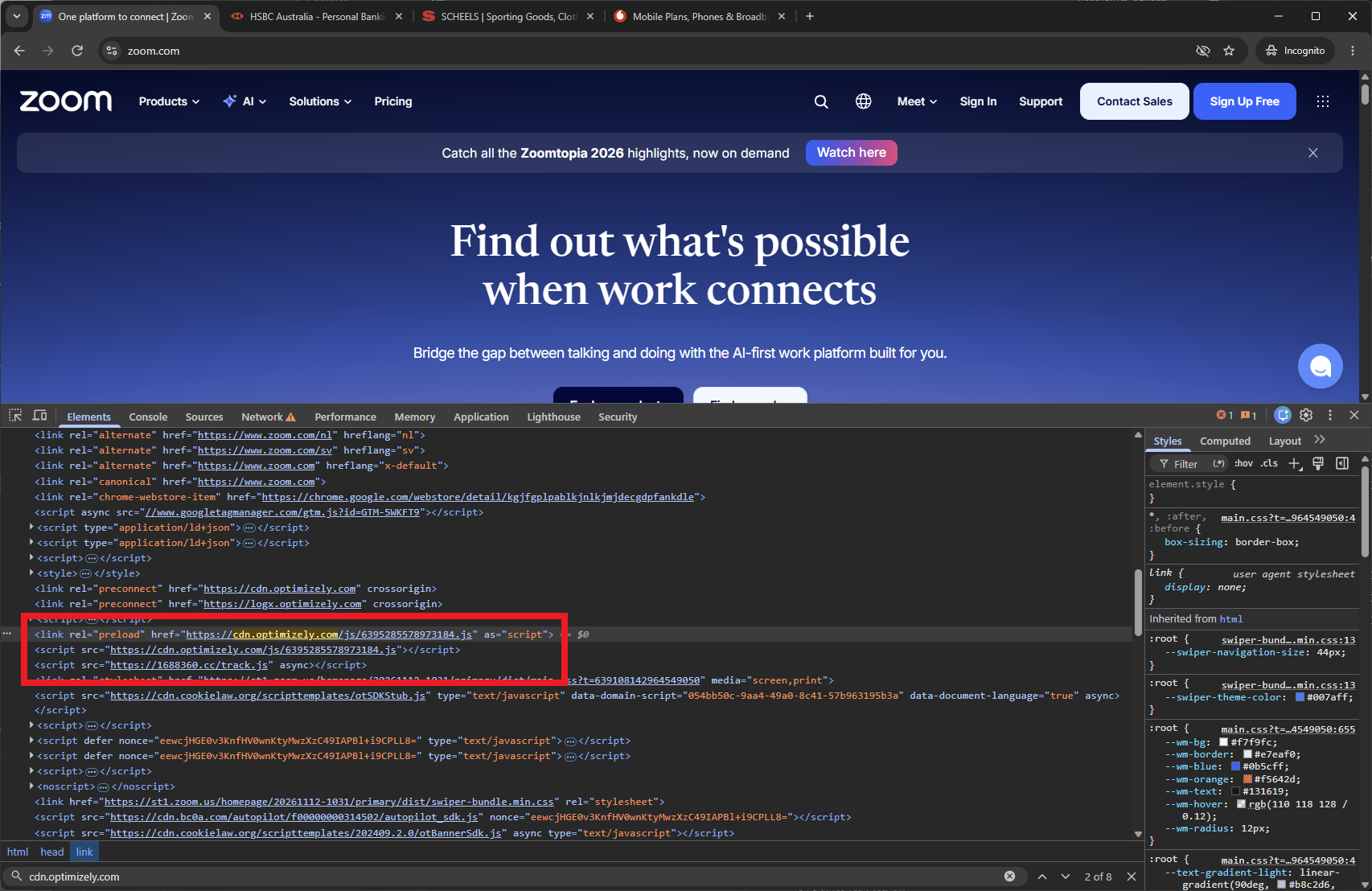
They are loading the script tag:
<script src="https://cdn.optimizely.com/js/6395285578973184.js"></script>This script tag tells the browser to do the following things:
- Go to
https://cdn.optimizely.com/js/6395285578973184.jsand fetch whatever code is there. - Run whatever code we got.
Of course, the risk is that the code being served at that URL changes, and that's exactly what happened. This is your traditional JS supply-chain attack.
The code is often dynamic
This is one of the biggest points of resistance I see when we're working with companies and trying to get some visibility and control over the code that they're running. Those script tags that load code from third parties are often dynamic by design, the code that they serve can and does change on a regular basis.
This makes it really hard, basically impossible, to have any control over what code is running when you don't know what code is supposed to be running. The code can change for a variety of reasons too:
- The vendor released an update with a new feature.
- The vendor patched the JS to fix a bug.
- Attackers installed malicious code...
Just pause for a second and imagine if you did this on your server. You fetched and ran dynamic code, at runtime, with absolutely no controls in place whatsoever. People would, quite rightly, think you were absolutely bonkers. Because you would be.
To put this another way, and this is the biggest hurdle to overcome for almost everyone I speak to. You can either say:
We know what code we're running on our website
Which means you need to have some idea about the content of those third-party files that contain code that you're loading and running on your website. Or you can say:
We don't know what code we're running on our website
This is the situation that I find most organisations are in.
How do we solve this problem?
The web platform has acknowledged that these threats exist for a very long time, and new features have been introduced to help combat the problem. These features are built into all modern browsers, and are freely available for anyone to use right now.
Subresource Integrity
I first wrote about SRI back in 2015 (yes, 11 years ago): Subresource Integrity: Securing CDN loaded assets
SRI is absolutely one of the first things that organisations should consider. You simply add an integrity attribute to your script tag, and when the browser downloads the script to run the code, it can check if it got the code you were expecting. SRI is often difficult to deploy, though, because if the code you're running is dynamic and can change at any point, how are we supposed to know what to check it against?
Content Security Policy
I first wrote about CSP back in 2014 (yes, 12 years ago): Content Security Policy - An Introduction
CSP allows you to take a lot of control over the behaviour of your website, including things like where it can load code from, and where it can send data to. CSP is the second measure that organisations should consider and it starts to offer real benefits, even in the face of dynamic JS like we saw here.
Often though, the issue that we hit with both SRI and CSP is that ultimately, everything is built to run dynamic code, so it's difficult to get to prevention. If you want to say "don't run bad code", you have to tell me "what is good code". Where we end up being with many organisations, and to be clear very few organisations use CSP and SRI, is a rapid detection and alerting capability.
What Report URI can do
CSP has a safe 'Report-Only' mode where instead of blocking things that shouldn't be there, the browser will send a 'violation report' to alert you that it has detected something that shouldn't be there, whilst still allowing it to run.

This allows website operators to be notified in near-real-time about changes to the code that is being served to their visitors, but without the risk of breaking anything in production. If your third-party JS file changes, let's say it gets a legitimate update from the vendor, it will continue to work and you will be notified of that change. If your third-party JS file changes because some new malware showed up, you will also be notified of that change and can take immediate corrective action.
This is how Report URI first became aware of the infected JS being served from Optimizely. At precisely 2026-11-16T15:06:23.6832074Z our Threat Intelligence pipeline flagged the first instance of the malicious activity on a customer website. This is what triggered our investigation, led to the discovery of the deeper issue, and the efforts to then notify Optimizely and the disclosure blog post linked above.
Visibility is better than nothing
A frequent criticism I hear from people I call "security absolutists" is that a CSP in Report-Only mode is pointless because it doesn't block anything. I couldn't disagree more with that statement.
Yes, of course a CSP in enforce mode is better than a CSP in Report-Only mode, in the exact same way that a CSP in Report-Only mode is better than nothing at all. Security is not a binary position, it's a sliding scale with a huge range between the two absolutes. You can have:
- No CSP at all, no visibility, no record.
- A CSPRO, full visibility of what code is running and when it changes.
- An enforced CSP, malicious behaviour is blocked.
If #3 is simply not possible for your organisation at present, then #2 is clearly a better option than #1 for anyone.
I really don't want this blog post to be a promotion for Report URI, and looking back as I write this I should get off my soap box soon, but we can provide enormous value with a CSPRO header.
Quickly, just to prove the point, here is everything you can do with CSPRO on Report URI:
- CSP Integrity allows you to know what JS is running on your site right now, today, in near-real-time.
- Script Vault and the JS Time Machine allow you to know what JS was running on your website last week/month.
- Script Watch will notify you if you get a new JS dependency, or an existing JS dependency changes its code.
- Threat Intelligence will tell you if any of the above changes are bad news.
All of that with absolutely no risk of breaking anything on your site, deployed in literally minutes with two HTTP response headers.
The industry needs to change
That change can and should start small, but it has to start with acknowledging that the idea of loading and running code from a third-party, dynamically at runtime, with no checks in place, is an inherently bad idea. I'm not saying that we shouldn't use third-party scripts, or that we should host all of our own code (you can, and we do, and there are some nice security and performance benefits), but at a minimum we should look at:
- Are all of these dependencies really necessary, can any be removed as they're no longer used? Reduce your attack surface, reduce your risk.
- Can you audit all of your existing dependencies right now, so you at least know what your exposure is? Do you know what code you're running today, or what code you were running last week?
- Put some kind of monitoring in place to know when that code changes, or when new code is introduced, and to audit that change and record it.
As the old saying goes: Trust, but verify.
Getting visibility of the scale of the problem is the first step and will largely dictate what course of action you should take. If you don't know what code you're running on your website right now, take the first step and find out.