
We recently uncovered a malicious browser extension affecting visitors to customer websites. It injected JavaScript into pages, hijacked outbound clicks through affiliate infrastructure, and quietly monetised user traffic. We spotted it not because a website was compromised, but because we monitor what code actually executes in the browser.

Even though the customers' website and supply chain were not compromised, the browser was still executing unauthorised JavaScript in the context of their site. That meant we could still see it. From the website owner’s point of view, this is outsourced client-side compromise: your visitors can be manipulated, redirected, and monetised while they are on your site, and you may never know it is happening.
How we do it
We collect and process a huge volume of telemetry data at Report URI, and sometimes that data reveals serious problems. Our main goal is to identify malicious behaviour in the JavaScript running on our customers’ websites, often introduced by traditional attacks like XSS or, more recently, supply-chain compromise. Sometimes, though, the malicious code does not come from the site or its supply chain at all. It comes from the client.
Browser Extensions
The only browser extension that I run is the 1Password extension to integrate with my password manager, that's it. I do not run, and will not run, any other browser extension simply because they terrify me. I don't feel like many people fully understand the access to your data that a browser extension has. The ability to see what's on the page, see what you're typing, change what you see, interact with the DOM, and so much more. Browser extensions are effectively all-powerful and can do almost whatever they want. That's awesome when they provide legitimate, useful functionality, but you have a really big problem when the extension wants to do something less noble.

Amazing Refresh
Amazing Refresh presents itself as a simple tab auto-refresher, allowing users to set pages to automatically reload at a defined interval. While this functionality is real and works as advertised, it serves primarily as cover for a sophisticated malware operation running silently in the background.
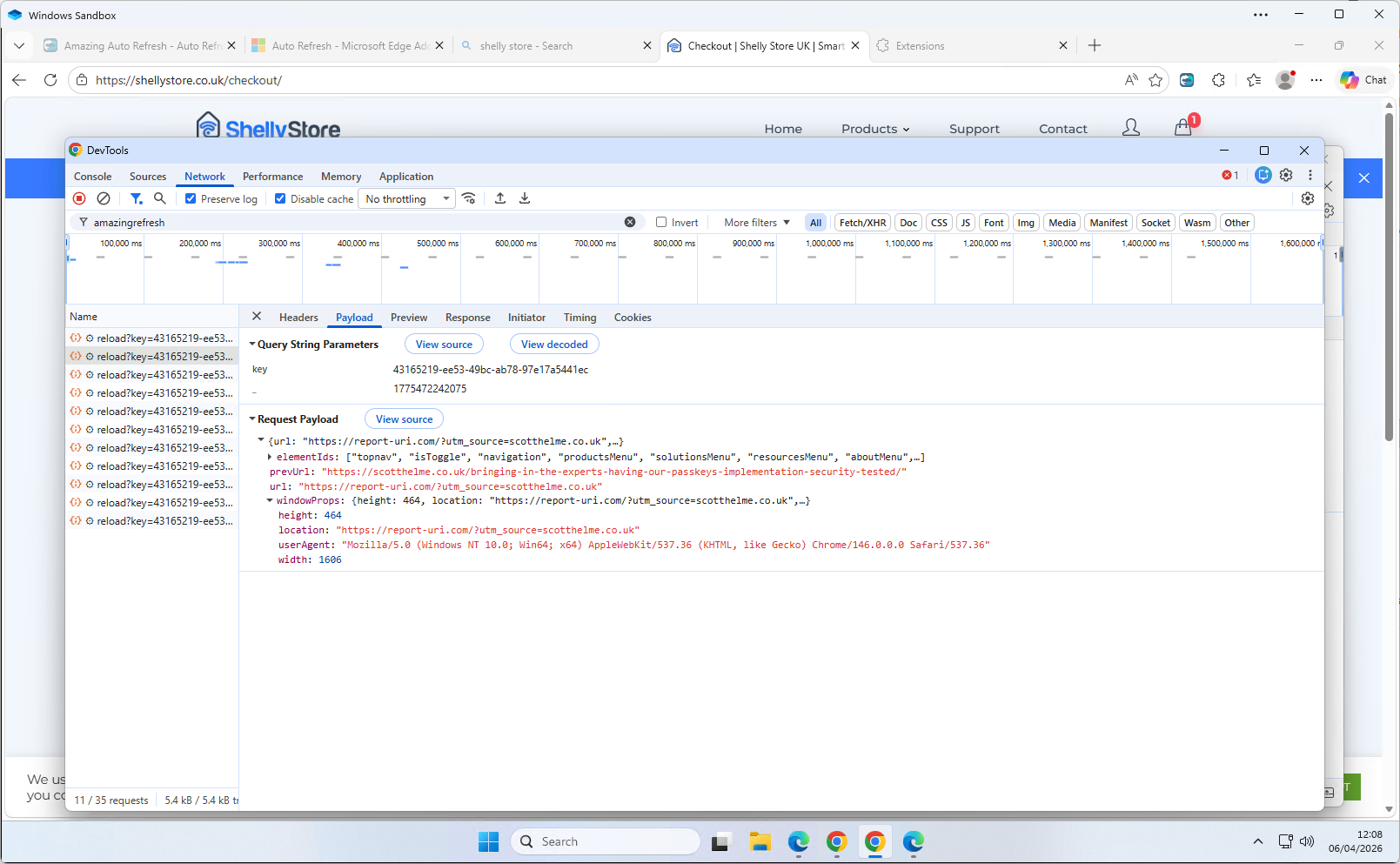
Every time a user navigates to any page in any tab, the extension fires a POST request to api.amazingrefresh.com/v1/reload, exfiltrating:
- The current page URL
- The previous page URL (tracking navigation paths across sites)
- Window dimensions and user agent
- Every element ID present on the page
- A unique client identifier tied to the user's Google Analytics profile
Here's a screenshot of the behaviour firing the request in my local Sandbox.
Script injection
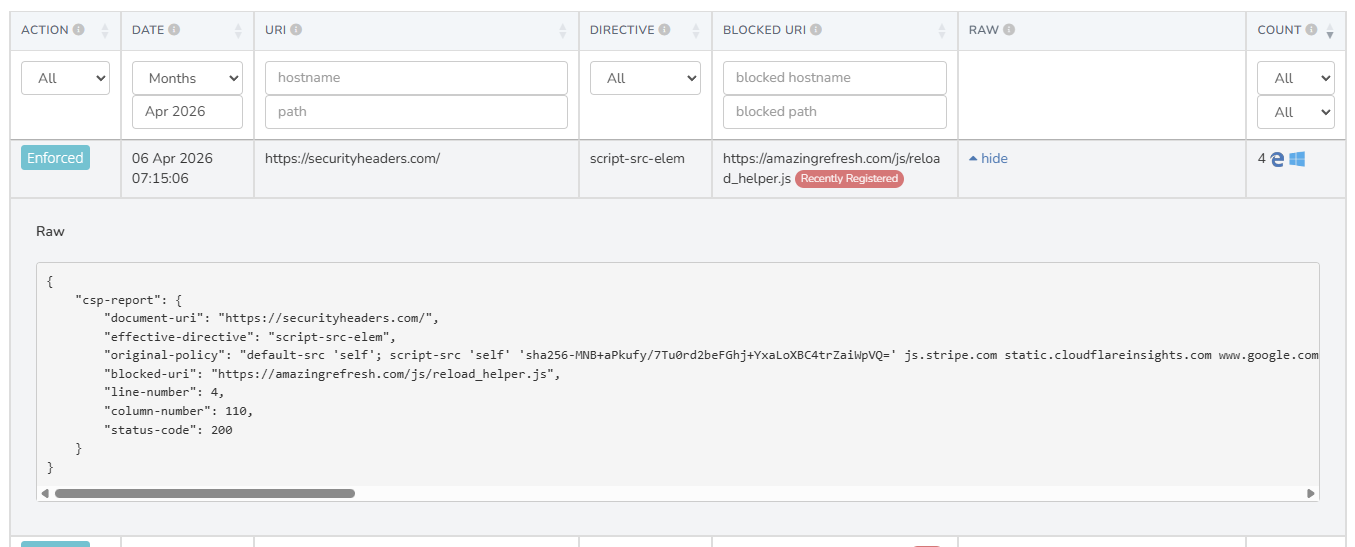
The extension injects a <script> tag directly into every page the user visits, running in the MAIN world — the same execution context as the page itself, bypassing Chrome's content script sandbox. The script injected is whatever URL the C&C server has most recently instructed it to use, stored in chrome.storage.local.
The default fallback script bundled with the extension (js/reload_helper.js) suppresses beforeunload dialog prompts — the "are you sure you want to leave?"
browser warnings. This is not accidental; it exists to make redirects performed by the injected payload seamless and invisible to the user. It's these script injections and external communications to GA that we were detecting and alerting on at Report URI.
The malicious payload
The remotely-delivered script that we observed being served from amazingrefresh.com/js/reload_helper.js is a sophisticated affiliate hijacker that steps through the following process at the time of inspection:
- Geolocates the user via
meetlookup.com - Fetches a list of affiliate domains from a CDN (
1752680588.rsc.cdn77.org) - Intercepts all link clicks on the page
- When a clicked link matches a known affiliate domain, redirects it through
advertisingshubb.com/pg/— an affiliate tracking gateway — monetising the click
without the knowledge of the user or website owner - Uses cookies to track which offers have been shown and clicked, with deduplication logic to avoid repeat redirects to the same offer
- Selects and prioritises offers based on the user's country, custom rates, PPS and PPL values
Evasion techniques
The browser extension and its behaviour are deliberately designed to avoid detection, which makes sense, and is likely how it has managed to get to almost 100,000 active installs. The extension package itself contains only innocuous looking code, so after unpacking and analysing the included code, there are no immediate alarm bells. The malicious JS payload lives on amazingrefresh.com and is served to the client dynamically only when certain conditions are met, further limiting the ability to detect the malicious behaviour. The malicious code:
- Uses session storage to ensure it only runs once per page load
- Suppresses page-leave prompts to hide redirects from the user
- The payload removes itself from the DOM
- Fingerprints the depth of iframes, possibly to avoid analysis
- Suppresses click events so other analytics don't see them
- Hides the entire page during a redirect
On top of all of that, and I think quite interesting, they're using Google Analytics to monitor their infected user base, firing an event every 60 minutes to keep track of how many infected devices there are!
Impact on website owners
We detected this attack because we're closely monitoring the JavaScript running on our customers' websites, and as I said at the start, we're typically looking out for traditional XSS attacks or supply chain compromise. The injection of this malicious JavaScript is happening entirely client-side, in the browser of the visitor, but we still have visibility of what's happening because of how our product works. For many products out there, this would be impossible to detect or monitor.
From our customers' perspective, outbound links on their site are being silently hijacked and monetised by a third-party, without their knowledge or consent. Visitors are being redirected through affiliate networks, potentially to different destinations than intended. The C&C architecture also means that the payload can be changed at any time to deliver anything from more aggressive adware, credential harvesting, a Magecart credit card skimmer, or just about anything that you could imagine. Whilst this doesn't represent a compromise of our customers' website, or their supply chain, this still raises genuine concerns that need to be addressed.
Reporting the malicious extensions
This extension is available for both Chrome and Edge, and we have reported it to both browser vendors including evidence of the malicious behaviour. Given that it appears to have almost 100,000 users across both browsers, I hope they can move quickly to remove the extension from the stores and affected devices. This will benefit not only those visitors to our customers' websites, but the wider ecosystem as a whole as we work to remove this malicious behaviour and protect all involved.
This capability aligns well with our goal of making the web safer for everyone, not just our customers, and is something that we have been working on for over a decade. My first blog post on detecting and blocking client-side compromise like this was in 2015(!), Combat ad-injectors with CSP, and in 2017 I followed that up with Malware hunting with CSP. Along the way, we have also detected and reported many browser extensions that introduced malicious behaviour, just as we have done here. When we come across more interesting cases like this one, I plan to start writing about them and sharing the details, primarily because I think these cases are genuinely interesting, but also because they help demonstrate some of our lesser-known capabilities at Report URI.
Indicators of Compromise
The key indicators are:
Chrome extension: link
Edge extension: link
Extension name: Amazing Refresh
Injected script host: amazingrefresh.com (domain registered 19th Feb 2026)
C&C server: api.amazingrefresh.com
Affiliate gateway: advertisingshubb.com (domain registered 3rd Oct 2025)
CDN: 1752680588.rsc.cdn77.org
Geo lookup: meetlookup.com
Injected script element ID: aar_main_script
Google Ads Measurement ID: G-11RPB8CJ47
If you want advanced threat detection and monitoring capabilities like this on your own site, you can head over to https://report-uri.com and start a 30-day free trial. Our JavaScript Integrity Monitoring solution shouldn't take more than 60 seconds to deploy and you can start gathering your first data.